May 2, 2026
Understanding Indexing in Databases with B-Trees and B+ Trees
Suppose we have a user table with a very large number of rows.
If we want to find one user by id, the database should ideally locate it quickly.
But if there is no index, the database may need to scan row after row until it finds the matching record.
This is where indexing comes into the picture.
An index acts like a guide that helps the database locate data faster without scanning the entire table every time.
In this article, we will first understand what indexing is and why it is needed. Then we will look at two important data structures used in database indexing:
- B-trees
- B+ trees
We will also understand why B+ trees are commonly preferred in real databases.
What Is Indexing and Why Is It Needed?
Indexing is used to speed up data retrieval in a database.
Think about the index section of a book.
If you want to find one topic and there is no index, you may have to go through many pages manually.
But if the book has an index, you can jump directly to the page number you need.
Database indexing works in a similar way.
Instead of scanning the full table, the database can use the index to quickly locate the row based on a column value such as id, email, or order_id.
An index is an additional data structure that stores metadata about the table data.
This metadata helps the database find rows efficiently.
To understand why indexing matters, it helps to first understand how table data is stored on disk.
Understanding the Disk Structure
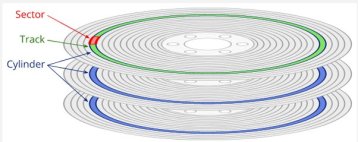
A disk consists of multiple platters, and each platter is logically divided into concentric circles called tracks.
The structure is generally understood like this:
Tracks and Sectors
- Each track is divided into equal-sized parts called sectors.
- A sector is the smallest physical storage unit the disk can read or write.
- A sector is typically 512 bytes or 4096 bytes in size.
Blocks
- A block is a logical unit of storage managed by the file system or database.
- A block can be one sector or multiple sectors.
- For simplicity, in this article we will assume:
1 block = 1 sector- block size =
512 bytes
How Do We Locate a Block?
A block can be located using:
- Track number
- Sector number
- Offset inside the block
How Data Is Stored in Blocks
Let us consider a table with 100 rows.
- Table size:
100rows - Row size:
128 bytes - Block size:
512 bytes - One block can store
4rows
So the total number of blocks required will be:
100 rows / 4 rows per block = 25 blocks
Block Layout Example
Block 1: Row 1, Row 2, Row 3, Row 4
Block 2: Row 5, Row 6, Row 7, Row 8
...
Block 25: Row 97, Row 98, Row 99, Row 100
How Data Is Retrieved
Without an Index
If there is no index, the database may perform a linear scan.
That means it may have to read block by block until it finds the required row.
For example, if we want to find row 15:
- Read block 1 and check the rows
- Read block 2 and check the rows
- Continue until the correct block is found
If each block stores 4 rows:
- Row
15will be in block 4 - Inside block 4, it will be the 3rd row
So without an index, the database may end up scanning many blocks before reaching the correct one.
With an Index
Now suppose we create an index on the id column.
For now, think of the index like a map:
- the key is the indexed column value
- the value is a pointer to the exact location of the row
The index stores:
- Keys: values such as
1,2,15 - Pointers: references to the block and offset where the row is stored
Example:
Key: 1  -> Block 1, Offset 1
Key: 2  -> Block 1, Offset 2
Key: 15 -> Block 4, Offset 3
The index itself is also stored on disk.
Let us assume the index takes 3 blocks.
Now the search becomes much more efficient:
- Without index: scan up to
25data blocks - With index:
- read
2-3index blocks - read
1data block - total
3-4I/O operations
- read
That is the core benefit of indexing.
What Is a B-Tree?
Before understanding a B-tree, let us briefly understand an m-way tree.
An m-way tree is a tree in which:
- Each node can have up to
mchildren - Each node can store up to
m - 1keys
A B-tree is a specialized version of an m-way tree with rules that keep the tree balanced.
A B-tree is a self-balanced tree data structure used for indexing in databases.
What Does a Balanced Tree Mean?
A balanced tree is a tree where the height is kept as small as possible.
All leaf nodes stay at roughly the same level, so the tree does not become skewed.
This matters because the database wants predictable and efficient search performance.
When new keys are inserted, the B-tree reorganizes itself to remain balanced.
That is why search, insert, and delete remain efficient.
Characteristics of a B-Tree
- Nodes contain keys and pointers
- Keys are stored in sorted order
- Nodes can have multiple child pointers
- All leaf nodes stay at the same depth
- Search, insert, and delete operations take O(log n) time
In a database-oriented explanation, a node may contain:
- key values
- child pointers
- and sometimes pointers to actual row data
Example
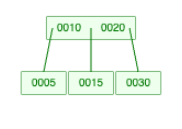
Here the branching factor is 3.
That means:
- each node can have at most
3child nodes - each node can store at most
2keys
All the leaf nodes are at the same level.
- The pointer to the left of key
10points to keys smaller than10 - The pointer between
10and20points to values between them - The pointer to the right of
20points to keys greater than20
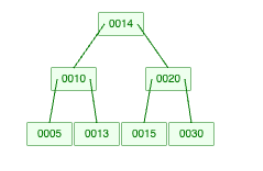
Now let us insert key 13.
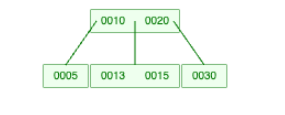
Next, let us insert key 14.
Since the branching factor is 3, key 14 cannot stay in the same node with 13 and 15. So the node splits and the tree readjusts to stay balanced.
This is enough background for our indexing discussion.
Now let us understand how indexing happens using a B-tree.
Indexing Using B-Trees
Let us take a simple user table with three columns:
idnameemail
We will insert rows into the table and see how the B-tree index changes.
Example User Table
| id | name | |
|---|---|---|
| 10 | Alice | alice@xyz.com |
| 20 | Bob | bob@xyz.com |
| 5 | Charlie | charlie@xyz.com |
| 15 | David | david@xyz.com |
| 30 | Eve | eve@xyz.com |
Step 1: Start with an Empty B-Tree
We begin with an empty B-tree.
As rows are inserted into the table, the index is also updated.
For this example, the branching factor is 3.
Step 2: Insert User with id = 10
Insert user 10, Alice, alice@xyz.com.

The root node now contains key 10.
Along with the key, the node stores a pointer to the actual row for user ID 10.
Step 3: Insert User with id = 20
Now we insert 20, Bob, bob@xyz.com.

The root node now contains keys 10 and 20, each pointing to its row.
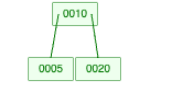
Step 4: Insert User with id = 5
Now we insert 5, Charlie, charlie@xyz.com.
Since the root can hold only 2 keys, it splits.
Key 10 becomes the root, and 5 and 20 become child nodes.
Step 5: Insert Users with id = 15 and id = 30
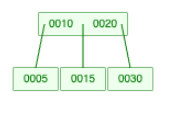
Searching for User ID 30
- Start at the root node
- Compare with keys
[10, 20] - Since
30 > 20, move to the right child - Find key
30 - Follow the pointer to the actual row
Searching for User ID 20
- Start at the root node
- Compare with keys
[10, 20] - Key
20is found directly in the root node - Follow the pointer to the actual row
So the database does not need to scan rows sequentially.
It follows the tree structure and reaches the correct record with fewer I/O operations.
Limitations of a B-Tree Index
B-trees are good, but they have a couple of limitations when we think in terms of database indexing.
1. Range Queries Can Be Less Efficient
Suppose we want to find all user IDs between 10 and 30.
In a B-tree:
- some keys may be in internal nodes
- some keys may be in leaf nodes
- leaf nodes are not necessarily linked sequentially for fast scanning
So for a range query, we may need to move through different branches and levels of the tree.
That makes sequential retrieval less efficient.
2. Internal Nodes Can Store More Than Just Search Keys
In a B-tree, nodes may store both:
- search keys
- pointers to actual data
This makes internal nodes heavier.
And when internal nodes are larger, fewer keys fit in one disk page.
That can increase the height of the tree and affect performance.
These limitations are a big reason why real databases commonly use B+ trees.
What Is a B+ Tree?
A B+ tree is an extension of the B-tree.
It keeps the tree balanced like a B-tree, but it is more suitable for database indexing, especially for range queries.
Key Differences from a B-Tree
-
All data pointers are stored in leaf nodes
- Internal nodes store only keys and child pointers
- Leaf nodes store keys and pointers to actual data
-
Leaf nodes are linked
- Leaf nodes are connected, typically like a linked list
- This makes sequential and range-based traversal much faster
Because of these two properties, B+ trees are more efficient for many database workloads.
Example: Inserting into a B+ Tree
Let us use the same user table and see how a B+ tree evolves.
Initial User Table
| id | name | |
|---|---|---|
| 10 | Alice | alice@xyz.com |
| 20 | Bob | bob@xyz.com |
| 5 | Charlie | charlie@xyz.com |
| 15 | David | david@xyz.com |
| 30 | Eve | eve@xyz.com |
Step 1: Insert User with ID 10
Since the tree is empty, we create a leaf node for key 10.
[ 10 ] -> Points to (10, Alice, alice@xyz.com)
Step 2: Insert User with ID 20
Since there is space in the same leaf node, 20 is inserted there.
[ 10, 20 ]
  -> (10, Alice, alice@xyz.com)
  -> (20, Bob, bob@xyz.com)
Step 3: Insert User with ID 5
Now the node overflows and splits.
A new root is created with key 10, and the leaf nodes are split.
Notice one important thing:
The key 10 still remains in the leaf node because the leaf nodes store the actual data pointers.
        [ 10 ]
       /      \
   [ 5 ]    [ 10, 20 ]
Step 4: Insert User with ID 15
Now 15 is inserted in sorted order into the right leaf node.
        [ 10 ]
       /      \
   [ 5 ]   [ 10, 15, 20 ]
Step 5: Insert User with ID 30
The right leaf becomes full and splits again.
           [ 10, 20 ]
         /     |      \
      [ 5 ] [ 10, 15 ] [ 20, 30 ]
At the leaf level, the nodes are linked, which makes sequential traversal efficient.
Searching for User ID 30
- Start at root
[10, 20] - Since
30 > 20, move to the right leaf - Find key
30 - Follow the pointer to the actual row
Range Query: Find User IDs Between 10 and 30
This is where B+ trees really help.
- Reach the leaf node where
10is present - Start reading from that leaf node
- Follow the linked leaf nodes sequentially
- Collect
10,15,20, and30
This is much more efficient than jumping across different parts of the tree.
Why Databases Commonly Prefer B+ Trees
In real database systems, B+ trees are usually preferred over B-trees because:
- internal nodes stay smaller
- more keys fit in one page
- tree height stays smaller
- lookups remain efficient
- range queries become much faster
This is especially important for queries like:
SELECT * FROM users WHERE id BETWEEN 10 AND 30;
Or:
SELECT * FROM orders WHERE created_at BETWEEN '2026-01-01' AND '2026-01-31';
These are very common in real applications.
Conclusion
Indexing is one of the most important ideas in databases because it reduces the amount of data the database has to scan.
The high-level flow is simple:
- data is stored on disk in blocks/pages
- an index stores keys with references to data locations
- tree-based indexes keep lookups fast even as data grows
B-trees help us understand the balancing idea.
But in practice, B+ trees are usually a better fit for databases because they keep internal nodes compact and make range queries efficient.
If you are learning databases deeply, understanding B-trees and B+ trees is a very good foundation because it explains why indexes are fast and also why some queries perform better than others.
Thanks for reading.