November 15, 2025
Simplifying Complex Systems with the Facade Design Pattern
Imagine planning a trip by yourself – finding flights, booking hotels, sorting transportation, and planning activities. It's a lot of work.
Now, think about using a travel agency. It's like a helper that takes care of everything behind the scenes. You tell them what you want, and they handle flights, hotels, transportation, and activities. It makes the whole process easy.
In software design, the Facade Pattern is similar. It helps by doing tasks that clients would usually do one by one. It gives a simple way to interact with a complex system, just like a travel agency makes trip planning simpler.
What is the Facade Design Pattern?
The Facade Design Pattern is a way to simplify the usage of a complex system by providing a simplified interface. It acts as a middleman between the client (the one using the system) and a set of classes forming the system. The goal is to present a unified, easy-to-use interface that abstracts the system's intricate details.
Why should we use the Facade Design Pattern?
The Facade Pattern is not compulsory, but it's a useful tool for simplifying interactions with complex systems. Here's why we should use the Facade Pattern:
-
Simplifying Complexity: The pattern provides a simplified interface to a set of interfaces within a subsystem, making it easier for clients to use without understanding the complexities of the system.
-
Refactoring and Maintenance: Facade is often used during refactoring to improve the structure of existing code. It encapsulates complex subsystems, making the codebase more maintainable by isolating changes to a single location.
-
Client Convenience: Facade enhances user experience by providing a user-friendly interface.
Implementation: Using Facade for E-commerce application
Imagine you want to buy a product online. Without the Facade pattern, the code for placing an order might involve interacting with multiple subsystems such as inventory management, payment processing, and shipping. Each of these subsystems might have its own set of classes and complexities.
-
InventoryManager:
class InventoryManager { public void checkProductAvailability(String product) { System.out.println("Checking availability of " + product); } }-
This class represents a subsystem responsible for managing inventory.
-
It has a method
checkProductAvailabilitythat prints a message indicating the check for product availability.
-
-
PaymentProcessor:
class PaymentProcessor { public void processPayment(double amount) { System.out.println("Processing payment of $" + amount); } }-
This class represents another subsystem responsible for processing payments.
-
It has a method
processPaymentthat prints a message indicating the processing of a payment.
-
-
ShippingService:
class ShippingService { public void shipProduct(String product, String address) { System.out.println("Shipping " + product + " to " + address); } }-
This class is a subsystem handling the shipping service.
-
It has a method
shipProductthat prints a message indicating the shipping of a product to a specified address.
-
Without Facade:
Let us understand, how the client will interact with the system when Facade pattern is not applied.
-
Client Code:
public class WithoutFacadeExample { public static void main(String[] args) { // Without Facade, the client needs to interact with each subsystem individually InventoryManager inventoryManager = new InventoryManager(); PaymentProcessor paymentProcessor = new PaymentProcessor(); ShippingService shippingService = new ShippingService(); inventoryManager.checkProductAvailability("Smartphone"); paymentProcessor.processPayment(500.0); shippingService.shipProduct("Smartphone", "123 Main St"); } }-
In the
mainmethod, the client interacts with each subsystem individually. -
It creates instances of
InventoryManager,PaymentProcessor, andShippingService. -
It then calls methods on each subsystem (
checkProductAvailability,processPayment,shipProduct) to perform specific tasks related to inventory, payment, and shipping.
-
Without the Facade Pattern, clients have to manage interactions with each subsystem separately, which can become complex and less maintainable, especially as the system grows. The Facade Pattern aims to simplify such interactions by providing a higher-level, unified interface to these subsystems.
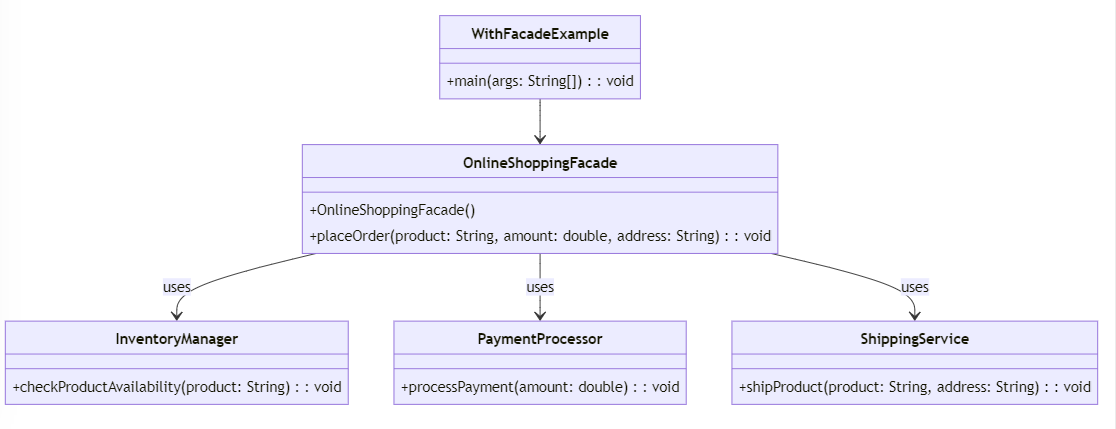
With Facade:
-
OnlineShoppingFacade
// Facade Class - OnlineShoppingFacade class OnlineShoppingFacade { private InventoryManager inventoryManager; private PaymentProcessor paymentProcessor; private ShippingService shippingService; public OnlineShoppingFacade() { this.inventoryManager = new InventoryManager(); this.paymentProcessor = new PaymentProcessor(); this.shippingService = new ShippingService(); } public void placeOrder(String product, double amount, String address) { // Simplified order placement using subsystems inventoryManager.checkProductAvailability(product); paymentProcessor.processPayment(amount); shippingService.shipProduct(product, address); System.out.println("Order placed successfully."); } }-
The
OnlineShoppingFacadeis a facade class that encapsulates the complexity of interacting with the subsystems:InventoryManager,PaymentProcessor, andShippingService. -
It has a method
placeOrderthat takes product details (name, amount, address) and simplifies the order placement process. -
Within
placeOrder, it calls methods from each subsystem (checkProductAvailability,processPayment,shipProduct) to perform the necessary tasks.
-
-
Client Code (WithFacadeExample):
public class WithFacadeExample { public static void main(String[] args) { // With Facade, the client can place an order with just one method call OnlineShoppingFacade shoppingFacade = new OnlineShoppingFacade(); shoppingFacade.placeOrder("Laptop", 1200.0, "456 Oak St"); } }-
In the
mainmethod, the client interacts with the simplified interface provided by theOnlineShoppingFacade. -
It creates an instance of the facade (
OnlineShoppingFacade) and calls theplaceOrdermethod to initiate the order placement for a laptop.
-
With the Facade Pattern, clients no longer need to interact with each subsystem individually. Instead, they can use the simplified interface provided by the facade, making the code more readable, maintainable, and user-friendly.
Conclusion
In this article, we saw how the Facade Design Pattern helps in refactoring, enhancing code maintainability, and creating a more user-friendly client experience.
If this was helpful, do give it a like and share among your peers
Till then, Happy Coding!
Complete implementations can be found on Github